

Most businesses treat their knowledge base as a support tool only. It answers questions for people who already know your product.
But a knowledge base can do more than that. With the right setup, it can show up in Google search results.
It can bring in new visitors. It can even lower your support costs.
This is what I mean by knowledge base SEO. You take your help center and make it work as hard as the rest of your website.
What Is Knowledge Base SEO?
A knowledge base is different from a blog. People do not read it for fun.
They come with a problem. They want a fast answer.
Knowledge base SEO means setting up your help articles so Google can find them, rank them, and send the right person to the right page. Done well, your knowledge base stops being just a cost center.
It starts working like a marketing channel.
Why This Matters for Your Business
Here is the simple math. A clear and easy-to-find answer can reduce repeat support tickets.
Many support teams track cost per ticket closely. Even a small drop in ticket volume can save real money each month.
On top of that, many customers would rather find their own answer than call support. If your knowledge base is hard to find, you are pushing people toward your more expensive support channels.
Worse, some of them may just leave and go to a competitor instead.
The On-Page Basics
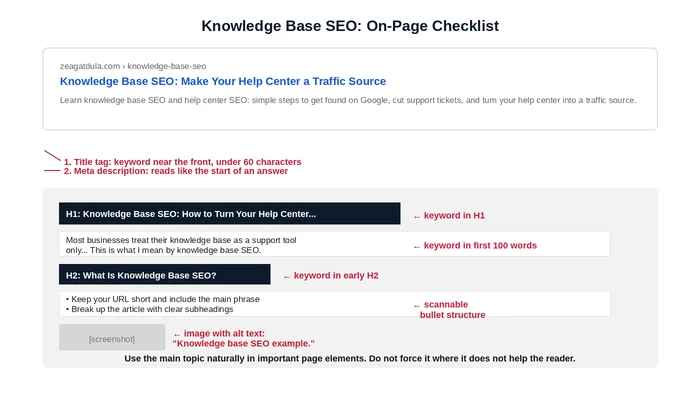
Your help articles need the same SEO basics as any other page. A few things matter more here, because people search with very specific questions.
- Keep your URL short and include the main phrase the article answers
- Put your target phrase near the front of the title tag
- Write your meta description like the start of an answer, not a sales pitch
- Answer the question in your very first sentence
- Break up the article with clear subheadings that match real questions
- Add alt text to every screenshot or image
Organize It So Google Can Find Everything
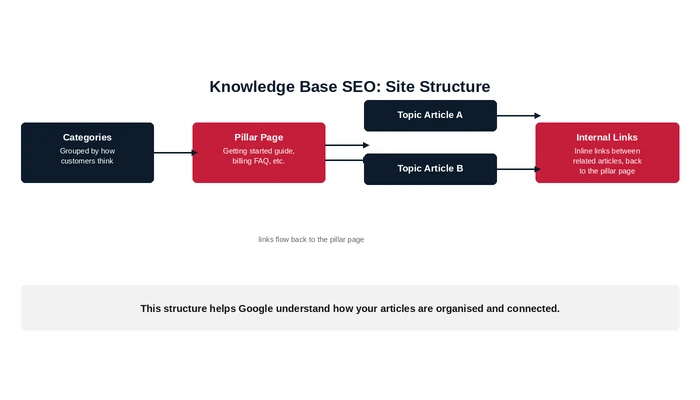
A few good articles will not help much if your knowledge base is hard to navigate. The best help centers share a few habits.
- Group articles into categories that match how your customers think, not how your team built the backend
- Build a few pillar pages, like a getting started guide or a billing FAQ, and link related articles back to them
- Add breadcrumbs so people and Google know where they are
- Link between related articles right in the text, not just in a related articles box at the bottom
Match What People Are Actually Searching For
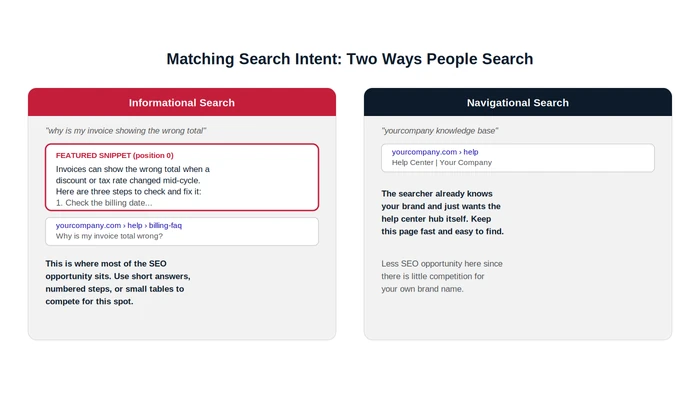
Knowledge base searches usually fall into two types. Some people are looking for your help center by name.
Others have a specific problem and just want an answer. Most of the SEO opportunity is in that second group.
Write your answer using short paragraphs, numbered steps, or small tables when you can. These formats may improve your chances of appearing in a featured snippet or another prominent search result.
Do Not Skip the Technical Basics
None of this works if your site is slow or hard to use on a phone. Most people search for help while they are already stuck on a problem, often on their phone.
If your page is slow to load, they will leave before they get an answer. Keep your sitemap updated too, since knowledge bases tend to grow fast.
Keep your content current as well. An outdated article may lose visibility over time, and it can give a customer incorrect information about a product that has since changed.
That can be more damaging than having no answer at all.
How to Know If It Is Working
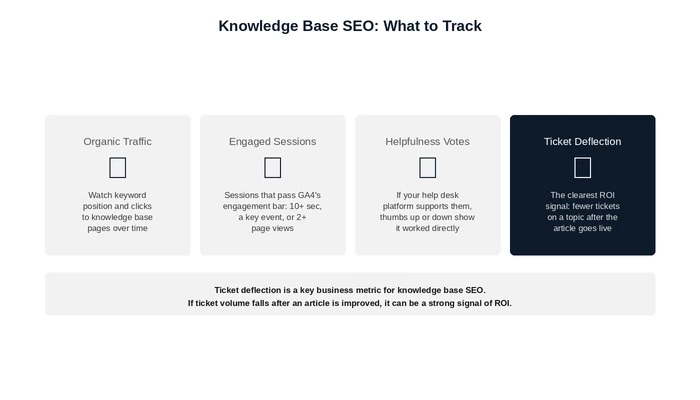
Track this like any other SEO project, along with several support-focused metrics.
- Organic traffic and keyword rankings
- Engaged sessions and average engagement time give you a better signal of interaction than bounce rate alone
- Article helpfulness votes, if your help desk platform supports them
- Internal searches performed right after reading an article, which can flag a confusing or incomplete answer
- Ticket deflection by topic. If your support team tracks tickets by topic, a drop after you publish or improve an article is one of the clearest signs it may be working
Frequently Asked Questions
Is knowledge base SEO different from regular SEO?
The basics are the same. Keywords, structure, and technical SEO still matter.
But the goal is different. Someone reading a knowledge base article wants a fast answer, not a sales pitch.
That changes how you write the page and what counts as a good result.
What should I fix first?
Start with structure. Fixing your categories, pillar pages, and internal links usually helps more than rewriting one article at a time.
It lifts your whole knowledge base at once.
How do I know which articles to work on first?
Look at your site search data and your support ticket topics. They show you exactly what people are looking for and not finding.
Will this really lower my support costs?
It can lower support costs when customers can find and use the answers. Many customers would rather solve a problem on their own than make a call, so a clear, easy-to-find answer can reduce repeat tickets.
How often should I update my knowledge base?
Update it every time you change your product. Do not wait for a set schedule.
Old information can mislead your customers.
What is the biggest mistake companies make with their knowledge base?
Treating it like a normal content project. Writing good articles is not enough if your categories and internal links are a mess.
Fix the structure first.